Introduction
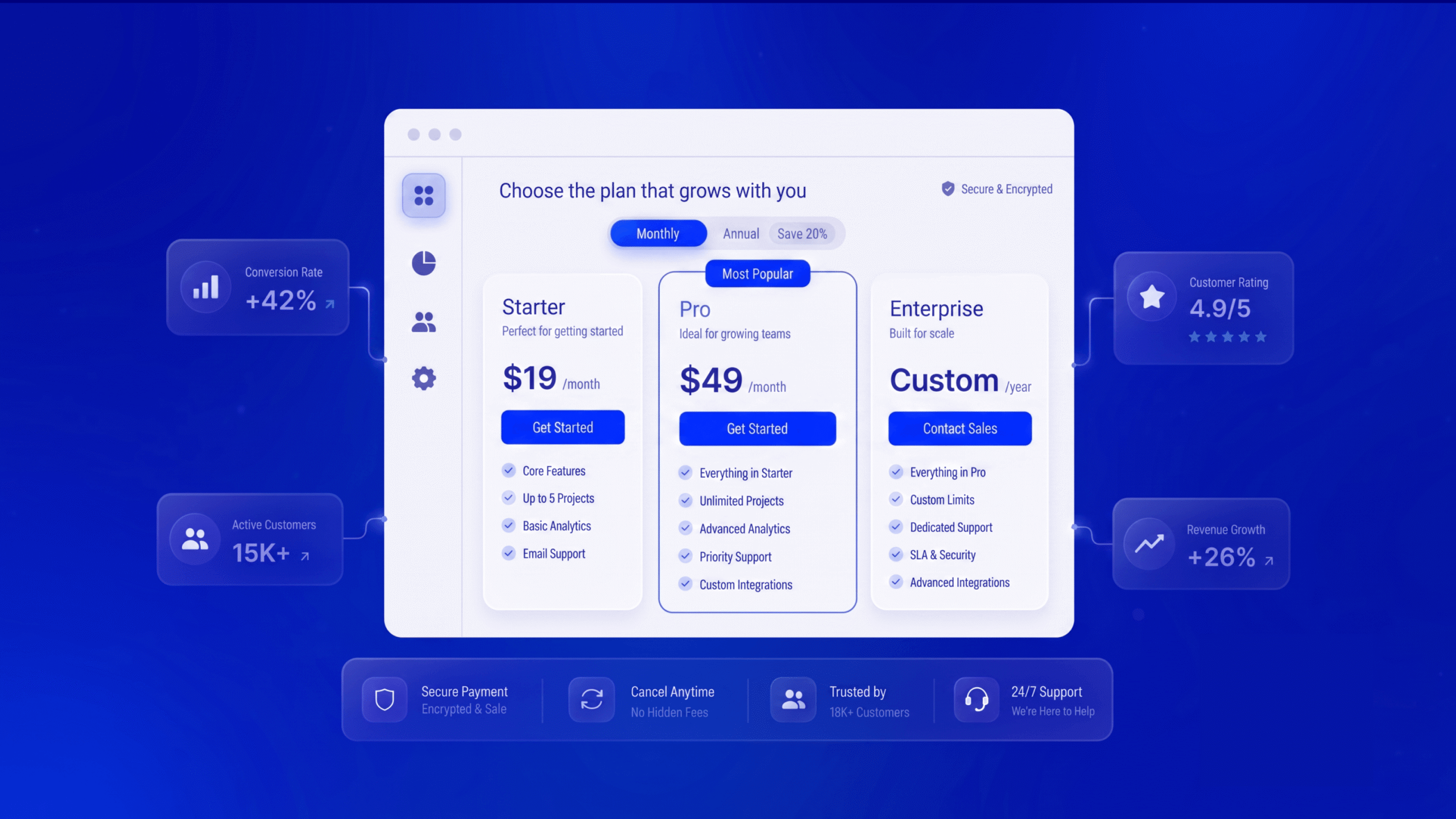
A SaaS pricing page is more than a list of subscription plans. It is a decision-making interface that helps potential customers understand value, compare options, and decide whether a product fits their needs. For users who have already tried a free plan, this page often becomes the bridge between product discovery and a paid commitment. If the information is confusing or the next step feels risky, even satisfied users may delay upgrading.
Strong SaaS Pricing Page UX connects business goals with the questions customers actually ask: What do I get? Which plan fits my use case? What happens if I upgrade? Can I trust the price? Thoughtful hierarchy, transparent messaging, and relevant prompts can reduce uncertainty without relying on pressure tactics. Below are eight practical design patterns SaaS teams can test to improve free-to-paid conversions.
1. Make the Value Difference Between Plans Obvious
People should not have to decode a feature matrix to understand why a paid plan is worth considering. Lead with outcomes and meaningful limits, not a long list of technical features. For example, a collaboration platform might explain that the free tier supports small teams, while a paid tier adds advanced permissions, expanded history, and team-level reporting.
Use concise plan summaries and keep the most decision-relevant differences near the top. Group secondary features under clear labels or expandable sections. The goal is not to make the free plan look weak; it is to help users recognize the point at which a paid plan better supports their needs. This principle also supports broader SaaS design best practices by reducing cognitive load and making the interface easier to scan.
2. Recommend a Plan Without Hiding the Choice
A highlighted “Recommended” or “Best for growing teams” plan can help users who are unsure where to start. The label should reflect a real use case, such as team size, workflow complexity, or usage volume—not simply the plan with the highest price.
Support the recommendation with a short explanation, such as “Best for teams that need shared reporting and automated workflows.” Keep all plans accessible and allow visitors to compare them. If every plan is marked as the best choice, the signal loses credibility. Test recommendation labels with different customer segments and review whether they improve paid upgrades without increasing refunds or downgrades.
3. Explain Usage Limits in Plain Language
Free users often reach a natural upgrade point when they need more seats, projects, storage, reports, integrations, or automation runs. Make these limits easy to understand before users encounter them. Instead of vague labels such as “enhanced capacity,” show a concrete limit and explain what changes in the paid plan.
Where possible, connect pricing-page information to the user’s actual product activity. If a customer has used most of their monthly allowance, a contextual message can show current usage, the limit, and the benefit of upgrading. Avoid surprise restrictions or unclear reset dates. Transparent limits create a more predictable experience and help users evaluate the upgrade on its merits.
4. Offer Monthly and Annual Billing With Clear Savings
A billing toggle can help customers choose between flexibility and a lower effective price. Present monthly and annual options with the full cost clearly stated. If annual billing saves a specific amount or percentage, show the calculation in a way that is easy to verify, and clarify whether payment is collected upfront.
Do not make the monthly price difficult to find or rely on a small-print disclaimer to explain billing terms. Explain cancellation, renewal, and refund conditions close to the decision point. The best pricing page design builds confidence by making the financial commitment understandable—not by steering every visitor toward the same billing option.
5. Use Contextual Upgrade Prompts at the Moment of Need
A pricing page does not have to do all the conversion work alone. In-product upgrade prompts can connect a paid feature to a task the user is already trying to complete. For example, when a user selects an advanced analytics report, the interface can explain which plan includes it and offer a clear route to compare plans.
Keep the prompt specific, useful, and easy to dismiss. Explain the benefit before showing the call to action, and avoid interrupting critical workflows with repeated modals. A consistent journey from product experience to pricing page reduces the effort needed to understand the upgrade. Teams can improve this journey through user research and iterative UX design and usability testing.
6. Reduce Risk With a Clear Trial and Cancellation Policy
Customers may hesitate because they are unsure what happens after they enter payment details. Answer practical questions near the primary call to action: Is a credit card required? When does billing begin? Will the subscription renew automatically? Can the user cancel online? What happens to their data after cancellation?
Use direct language and avoid promises the product or business cannot guarantee. If a trial converts automatically to a paid plan, state that clearly and explain when the first charge occurs. If cancellation is self-serve, say so. Clear policies help users make informed decisions and can prevent support complaints caused by misunderstanding.
7. Add Relevant Proof, Not Decorative Testimonials
Social proof can reassure users that a product is established and useful, but it works best when it answers a concern relevant to the plan. A short customer quote about team collaboration may be more persuasive beside a team plan than a generic statement about great service. Where permission and accurate data are available, use recognizable customer names, specific use cases, or verifiable results.
Avoid unsupported statistics, anonymous claims that cannot be substantiated, or testimonial carousels that distract from plan comparison. Pair proof with clear product information and accessible support options. For enterprise or higher-value plans, security details, integration information, and a route to speak with the team may be more helpful than another promotional quote.
8. Design a Focused, Accessible Call to Action
Every plan should have a clear next step that matches the user’s level of intent. “Start free trial,” “Upgrade plan,” “Choose plan,” and “Talk to sales” communicate different commitments. Use action labels that accurately describe what happens next, and keep the primary action visually distinct without making secondary choices invisible.
Check the page on mobile devices, where wide comparison tables can become difficult to use. Make buttons large enough to tap, preserve readable contrast, use descriptive labels, and ensure keyboard users can navigate interactive controls. Avoid relying on color alone to communicate the recommended plan or selected billing option. Accessible, responsive interfaces make the decision easier for more people.
How to Measure Whether Your Pricing UX Works
A redesign should be evaluated against meaningful product and business outcomes. Track the percentage of eligible free users who visit the pricing page, plan comparison interactions, upgrade-button clicks, completed payments, and time from first pricing-page visit to upgrade. Segment results by acquisition source, device, customer type, and plan where data volume allows.
Use experiments to test one major change at a time when possible. A higher click-through rate does not necessarily mean more successful paid conversions, so follow the full funnel and monitor cancellations, refunds, support contacts, and retention. Combine quantitative analytics with usability sessions to learn not only what users do, but why they do it.
Conclusion
Effective SaaS Pricing Page UX is built around clear value, honest pricing, relevant guidance, and a low-friction path to action. The eight patterns above help users understand plan differences, recognize when an upgrade is useful, and feel confident about the commitment. No single pattern guarantees a conversion lift; the right combination depends on your product, audience, pricing model, and customer journey.
For SaaS teams, pricing-page optimization is part of the wider product experience—from onboarding and feature discovery to retention and expansion. TheFinch Design helps SaaS businesses shape clearer user journeys, intuitive interfaces, and conversion-focused digital products. Explore our SaaS UI/UX design services or review our pricing and engagement options to discuss how research-led design can support your product goals.
Frequently Asked Questions
What is SaaS Pricing Page UX?
SaaS Pricing Page UX is the way a pricing page organizes plan information, explains value, handles billing choices, and guides users toward an appropriate next step. Good UX makes pricing easier to understand and compare.
What is the most important element of a SaaS pricing page?
Clarity is foundational. Users should quickly understand who each plan is for, what is included, what limits apply, and what happens after they choose a plan.
How can a SaaS business improve free-to-paid conversions?
Start by identifying where eligible free users hesitate or drop off. Test clearer plan differences, contextual upgrade prompts, transparent billing terms, and relevant proof, then measure completed upgrades and downstream retention.
Should a SaaS pricing page show every feature?
Show the features and limits that influence plan choice first. If the full list is long, organize secondary details into scannable groups or expandable sections without hiding material terms.