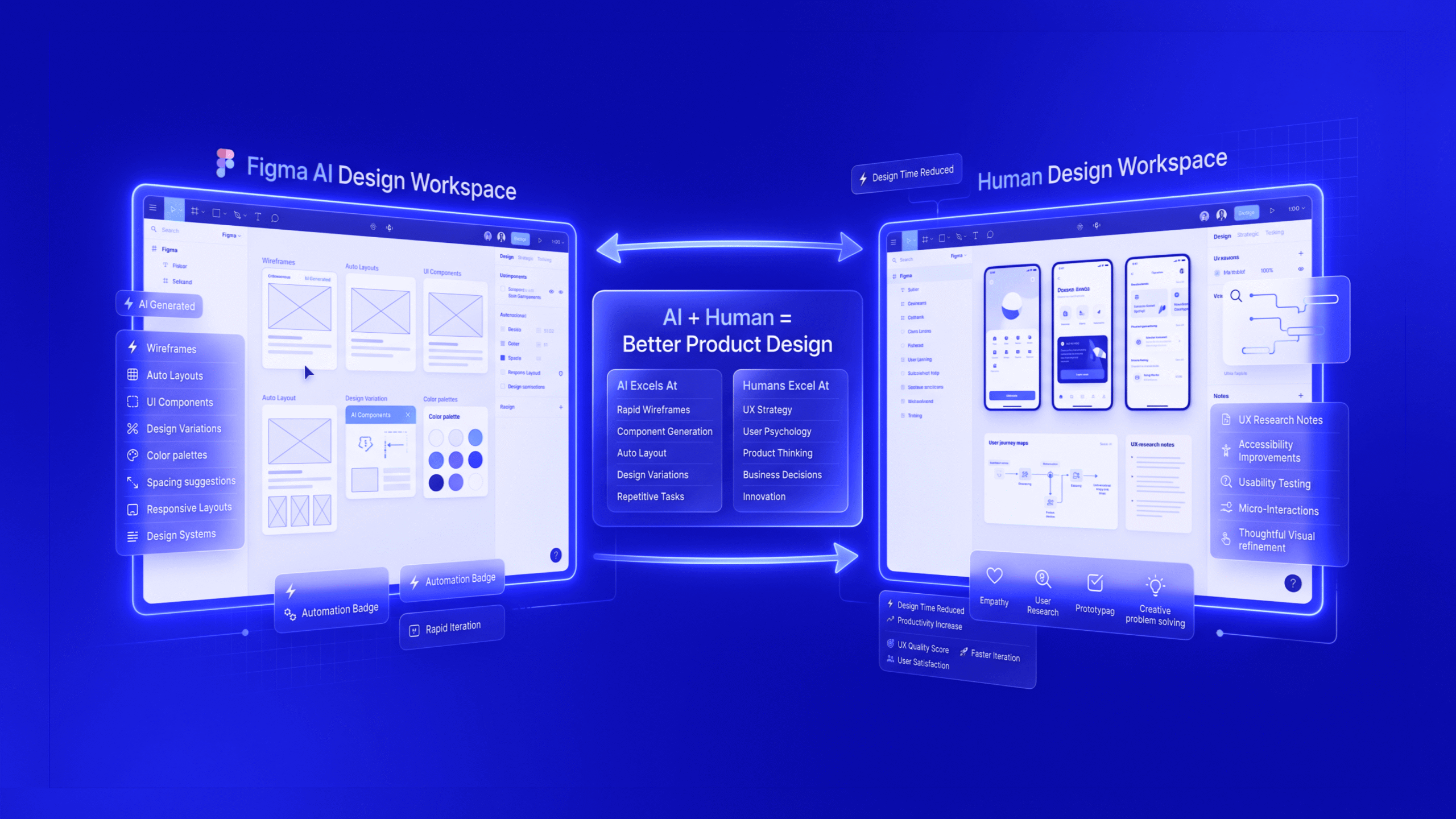
AI is revolutionising the way we design user experiences and drive digital growth. In today’s competitive market, businesses need fast, data-driven, and personalised solutions. An AI-Led Design Agency harnesses machine intelligence alongside human creativity to meet these demands. Leading UI UX design agencies are already using AI to craft smarter, more intuitive products. For example, one study notes that integrating AI into UI/UX design “is revolutionising how digital products are crafted, making them more intuitive, personalised, and accessible”. In practice, AI speeds up workflows, enables hyper-personalisation and unlocks insights at scale , all of which translate directly into growth (higher engagement, conversions and retention).
From automated wireframing to predictive interfaces, AI and design together are reshaping every step of the UX process. Rather than replacing designers, AI acts as a co-pilot: it handles repetitive tasks and data crunching so human experts can focus on strategy and creativity. As TheFinch Design’s leadership puts it, generative AI is “just a tool to polish our creativity” , used to enhance designs created by experts. In other words, AI-driven design makes UX teams far more productive without sacrificing human insight. This combination of efficiency and expertise is why AI-led UX design is increasingly seen as essential for digital growth.
AI Powers Faster, Leaner Design Workflows
AI accelerates the UX process, cutting years off traditional design timelines. Modern AI tools can take simple inputs (like rough wireframes or product requirements) and rapidly generate dozens of high-fidelity prototypes for review. For example, Figma’s AI features (such as Figma Make) let designers type a natural-language prompt and instantly produce prototype screens on-brand with existing components. In practice, 78% of designers say AI boosts their efficiency by automating routine tasks. Typical tasks an AI UX design agency might offload to algorithms include:
- Wireframing and Layout Generation: AI can create multiple layout variations or complete screen mockups from a text prompt or sketch. This spurs ideation , teams can compare dozens of alternatives in minutes instead of days.
- Content Creation: GPT-like models generate UI copy, button labels or onboarding text, removing a bottleneck in early design phases.
- Design System Maintenance: AI tools sync component libraries and design tokens across platforms, automatically flagging inconsistencies (colors, spacing, etc.).
- Accessibility and QA Checks: Automated tools (e.g. Stark, Evinced) scan designs for colour-contrast or WCAG issues. Catching these early avoids costly fixes later.
- Analytics-Driven Testing: Platforms like Heap or FullStory use AI to analyse user behaviour at scale and highlight UX friction (dead clicks, drop-offs). Combined with automated A/B testing, teams can validate UI changes faster without lengthy development cycles.
Each of these AI-powered steps drastically cuts time and cost. For instance, ProCreator (an AI-focused UX agency) reports that embedding AI into research, copywriting and QA “eliminates bottlenecks, minimises rework, and improves time-to-market”. The net effect is leaner teams that ship better experiences faster. In short, AI does the heavy lifting on low-value tasks so designers concentrate on innovation , a shift that yields faster product iterations and more frequent releases (critical for growth).
Personalisation and Engagement at Scale
AI personalisation is a game-changer for engagement and conversion. Today’s users expect interfaces tailored to them , and AI can deliver this at scale. By analysing vast user data (preferences, behaviour, context), machine learning algorithms adapt the UX in real time. For example, one e-learning app (Duolingo) used an AI system (“Birdbrain”) to adjust lesson difficulty dynamically. The result was a huge growth: daily active users jumped 40% year-over-year, and the proportion of monthly users logging in daily rose from ~20% to 37%. In other words, AI turned casual learners into daily habit-makers, a clear signal of product “stickiness”.
Sales and marketing data back this up. Personalization statistics show that 73% of customers expect companies to anticipate their needs, and 56% expect personal offers. Not surprisingly, businesses see big gains when they deliver. After adopting AI-driven personalisation strategies, 65% of ecommerce stores report higher conversion rates. In one study, product recommendations alone accounted for up to 31% of an online store’s revenue. These figures translate directly to growth: the more relevant the interface, the more users engage and buy.
Leading digital products have already demonstrated the impact. Social platform Pinterest now uses AI to “anticipate intent” by curating inspirational content rather than waiting for search queries. This shifted user behaviour , outbound ad clicks (despite no increase in ad volume) rose 40% because recommendations better matched preferences. Similarly, Shopify used AI to simplify checkout (one-page, dynamic upsells) and saw conversion rates improve by 7.5,20%. Across industries, the pattern is clear: AI-driven UX (personalised suggestions, adaptive flows, intelligent chatbots) boosts user satisfaction and conversions. By meeting each user where they are, AI-led design drives the sustainable growth businesses seek.
Data-Driven Insights and Smarter Decisions
AI doesn’t just design faster , it helps us know what to design. By processing user data and feedback at scale, AI uncovers insights that guide UX decisions. For example, AI-powered analytics can sift through qualitative surveys and interviews using natural language processing, surfacing common pain points much faster than manual analysis. Tools like Attention Insight even simulate eye-tracking to predict which parts of a design draw attention. These insights let teams prioritise changes with real evidence, rather than guesswork.
Academic research confirms the value of AI analytics. In a controlled study of 50,000 user sessions, researchers tested multiple AI techniques (like collaborative filtering and predictive clustering) on a digital platform. The results were striking: applying AI methods doubled conversion rates (from 6.2% to 14.5% with one technique) and significantly increased a “loyalty index”. In other words, AI can not only personalise the UX but also forecast user preferences and recommend design tweaks on the fly. For product teams, this means earlier identification of friction points and smarter feature prioritisation.
In practice, an AI-led agency will embed analytics throughout the UX lifecycle. As ProCreator advises, “we apply AI in areas such as accelerating UX research with automated analysis tools… interpreting user behaviour in real time to inform UX strategy”. By integrating data (from analytics platforms, CRM, heatmaps, etc.), an AI-centric workflow continually learns from user actions. This turns every release into a learning opportunity, driving a virtuous cycle of optimisation and growth. Over time, the product becomes more responsive and tailored , exactly what converts users into loyal customers.
Tools and Workflows for AI-Led UX Design
Top UI UX design companies are already equipping their teams with specialised AI tools. The typical workflow in an AI-led design agency might include:
- Design Co-Pilots: Tools like Figma AI (Make and Design) let designers generate layouts or edit interfaces via prompts. Adobe Firefly and Jasper are used to create images and text on demand. This means designers sketch an idea and AI produces a first draft, which the human refines.
- Generative Interfaces: Platforms such as Uizard or ChatGPT plug-ins can convert a hand-drawn sketch or text description into interactive wireframes. For example, Uizard can scan pen sketches into editable UI mockups.
- Accessibility and QA AI: Automated checks (e.g. Stark, Evinced) flag WCAG and UX issues in realtime. They scan contrast, spacing and consistency before code is written, saving weeks of rework.
- User Analytics AI: Tools like Heap, FullStory or AI assistants (e.g. “Asa” by Canvs.ai) analyze user sessions and feedback. They highlight patterns (dead clicks, common complaints) so designers know exactly where to improve.
- Prototyping AI: Services like Maze or Lookback use AI to simulate users and predict test outcomes. Synthetic test-users can flag usability issues (though real user testing remains essential).
- AI in Development: Integration with GitHub Copilot or Figma’s code export makes the handoff to developers smoother, as components and code snippets are generated from the design.
These tools are often combined in an AI-driven workflow. For example, an agency might start by using ChatGPT to brainstorm user journeys and interface content. Next, they drop the ideas into a Figma design with Make, generating multiple UI options. A researcher may employ an AI text analysis to summarise user interviews. Throughout, designers use AI QA checkers and analytics dashboards to iterate. The key is augmentation, not automation: the human team maintains vision and quality, while AI handles scale and computation. As a recent Figma report notes, “AI tools for UX designers are helping bridge the gap between rising expectations and limited time”, letting designers focus on the big picture.
Best practices emerge from industry experience:
- Start with Goals: Define what success looks like (e.g. boost sign-ups by 20%) and gather the right data. Curate datasets (brand assets, user logs) to “train” your AI processes.
- Set Guardrails: Give AI clear guidelines on tone, brand, and accessibility. For instance, specify your colour palette, typography and layout rules to the AI system.
- Iterate and Test: Always validate AI suggestions with real users. Use A/B testing to compare AI-generated variants, and refine based on feedback.
- Mitigate Bias: Monitor AI outputs for fairness. Human reviewers should check that recommendations aren’t inadvertently biased (e.g. only showing certain product suggestions to some demographics).
- Combine Strengths: Use AI where it excels (data analysis, scaling content), and keep humans in the loop for empathy, ethics and final judgment.
By weaving AI tools into each phase, agencies can deliver smarter UX while maintaining user-focus. As AI adoption matures, we’ll see more “context-aware” interfaces that adapt on the fly. But the human-centred design process remains vital: even TheFinch emphasises that they’re “not widely dependent on AI tools… we use them to enhance the design our experts create”. This balanced approach , pairing AI’s speed with seasoned UX expertise , is the hallmark of the modern AI-Led Design Agency.
Real-World Results: AI UX Case Studies
Concrete outcomes speak louder than theory. Real companies using AI-infused UX have seen measurable growth:
- Duolingo (Edtech): The language app’s AI tutor (Birdbrain) kept lessons in an optimal zone for each learner. This drove a 40% YOY jump in daily activities and a sharp rise in engagement (daily/monthly user ratio from 20% to 37%). The key was “solving for the right variable” , AI matched content to the user’s moment, making the product truly responsive.
- Shopify (eCommerce): By adding AI-based product recommendations at checkout and streamlining the cart via AI-driven session analysis, Shopify merchants saw checkout conversion rates climb 7.5,20%. These seemingly small UX tweaks (one-page checkout, contextual upsells) had an outsized impact because AI identified friction in real time.
- Pinterest (Social/Media): Pinterest’s AI engine now predicts what a user wants before they search. This change increased its ad click-throughs by 40%, without adding more ads , simply serving users what they like. The result? More revenue and engagement with no extra cost.
- E-Commerce Personalization: According to marketing data, adding personalised recommendations (like “Recently viewed” or “Frequently bought together” widgets) lifted add-to-cart rates and average order values. In one test, a retailer’s average order value rose by 10.5% after deploying AI-recommendation carousels. On average, product recommendations alone can drive up to 31% of online sales.
- Startups and SaaS: Our own clients’ successes echo the industry. TheFinch Design reports case studies such as a 20% conversion increase after a website redesign, and a 63% jump in daily active users from a mobile app redesign. These real results underscore how much growth is unlocked when UX is informed by data and optimised with AI.
Overall, evidence is mounting that AI-enhanced UX strategies build loyalty and revenue. A recent consumer-research study found multiple AI techniques significantly outperformed traditional methods on both conversion and engagement. In short, AI doesn’t just make design faster , it makes it smarter. By serving personalized experiences, anticipating user needs and continuously learning from data, AI-led design creates products that grow organically.
Future Trends and Best Practices
The intersection of AI and UX is still evolving, but some trends are clear:
- Generative Design: Expect more adaptive interfaces. Future apps may use generative AI to tailor layout and content to each user’s real-time context (location, mood, device). Designers will set the rules, and AI will improvise within them.
- Voice and Conversational UX: As voice assistants mature, designing UX for AI agents becomes key. Companies will optimise not just visual interfaces but conversational flows, blending UI and natural language.
- Explainability and Trust: UX will focus on making AI decisions transparent. Good AI-led design will include subtle hints or feedback that help users understand why certain suggestions or changes appear.
- Hybrid Teams: AI will take on more of the routine, so teams will shift roles: designers may become more like UX strategists and curators of AI output, guiding the machine rather than drawing every pixel.
For businesses, the takeaway is to start experimenting now. Work with an experienced UI/UX design agency that understands AI (an AI-Led Design Agency) so you can launch small, measurable pilots. For example, try AI-driven A/B tests, or add one predictive feature (like a chatbot or recommendation engine), and measure the impact. Use analytics to track results. Over time, scale up what works. Always keep the focus on real user needs, AI should accelerate your UX roadmap, not divert from it.
FAQs
- What is AI-led UX design?
AI-led UX design means using artificial intelligence throughout the user experience process. It can automate user research, generate interface designs, personalise content in real time, and analyse behaviour data. In practice, AI helps UX teams’ prototype faster, tailor experiences to each user, and iterate based on data.
- How does AI improve user experience?
By automating routine tasks, AI frees designers to focus on creativity. It can quickly test many design options, surface accessibility fixes, and personalise interfaces using user data. The result is faster project delivery and more relevant, satisfying experiences for users.
- Can AI replace UX designers?
No. AI is best thought of as a powerful assistant rather than a replacement. Designers still set goals, provide context and make final decisions. In fact, experts stress that AI’s role in UX is assistive. The most effective teams use AI to handle repetitive work, then apply human insight to polish the outcomes.
- What tools do AI-led design agencies use?
Leading agencies use a mix of AI-enabled tools. Examples include Figma’s AI features (for prompt-based design and auto-layout), generative content tools like Adobe Firefly or Jasper for images and copy, accessibility checkers (Stark/Evinced), and analytics platforms (Heap, FullStory). They might also use Uizard to turn sketches into mockups, or UX platforms like Maze for smart prototyping. Essentially, any tool that uses ML or generative AI to speed tasks fits into the workflow.
- How does AI-driven personalisation boost conversions?
AI personalises every user’s journey. It might recommend products you’re likely to buy, reorder a feed based on your past clicks, or adjust page layouts to match your preferences. This relevance raises engagement and sales. For instance, studies show personalised recommendations can make up ~31% of online store revenue, and 65% of retailers saw better conversion after adding personalisation. By meeting users’ expectations, AI-led design makes them more likely to act.
Ravi Talajiya
CEO of TheFinch
With over a decade of experience in digital design and business strategy, Ravi leads TheFinch with a vision to bridge creativity and purpose. His passion lies in helping brands scale through design thinking, innovation, and a deep understanding of user behavior.